United States · Social Security Administration
How to request your Social Security earnings and benefits record
- Time
- About 15–30 minutes if your provider confirms you immediately; add a video-call wait if you're verifying from abroad with ID.me. The Statement itself is instant once you're logged in.
- Cost
- Free
- You need
- Your Social Security number · A government-issued photo ID (a passport if verifying from abroad) · An email address · A device with a camera, if using ID.me
Before you start: Login.gov or ID.me - and which one can you even use?
Every sign-in to my Social Security now runs through one of two outside identity providers - Login.gov or ID.me (SSA retired its own passwords on 7 June 2025, for every account). Which one you can use comes down to your address: Login.gov only accepts a US address, so anyone living abroad must use ID.me instead. You'll need your SSN, a government photo ID (a passport if abroad), and an email.
If it doesn't look like this
I live outside the US. Which provider do I pick?#
ID.me - Login.gov cannot register you. Its account-creation flow has no address option for a civilian living abroad, only the 50 states, DC, the territories, and military addresses, and SSA's own FAQ confirms overseas customers should register with ID.me. This guide walks the Login.gov route because that is the route the screenshots follow; if you're abroad, choose 'Sign in with ID.me' at step 2 and rejoin the guide at step 6.
Go to ssa.gov/myaccount and press Sign in
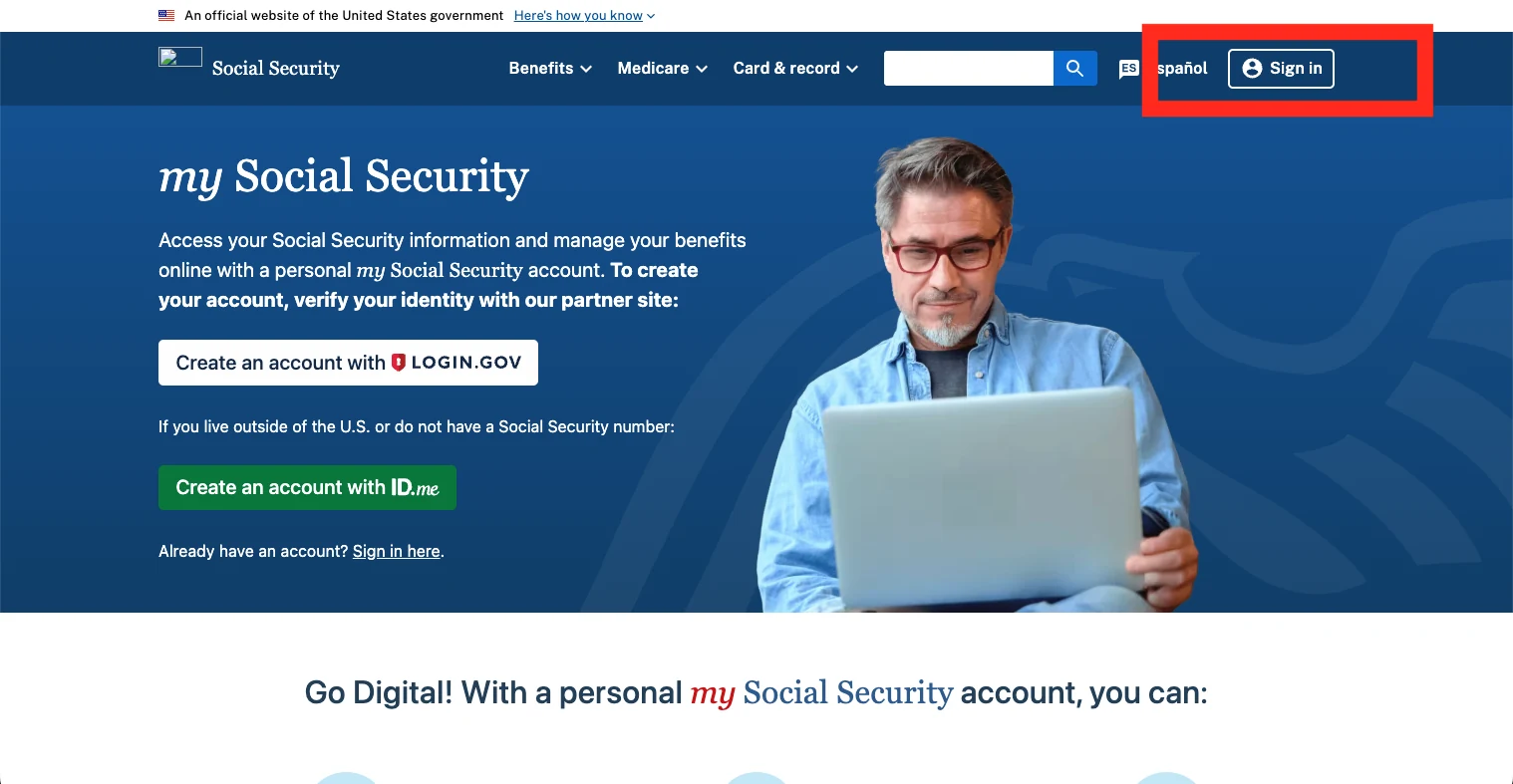
If it doesn't look like this
I already have an ID.me or Login.gov account from another government agency - do I need a new one for Social Security?#
No. SSA's transition FAQ is explicit: 'You do NOT need to create a new ID.me account specifically for Social Security online services.' One credential covers both government services and, for ID.me, a number of private-sector ones too. Use Sign In, not Create an Account.
Choose your credential service - Login.gov
This guide follows Login.gov, the route the screenshots show - press 'Sign in with Login.gov'. If your mailing address is outside the US, Login.gov can't register you: use 'Sign in with ID.me' instead, then rejoin the guide at step 6.
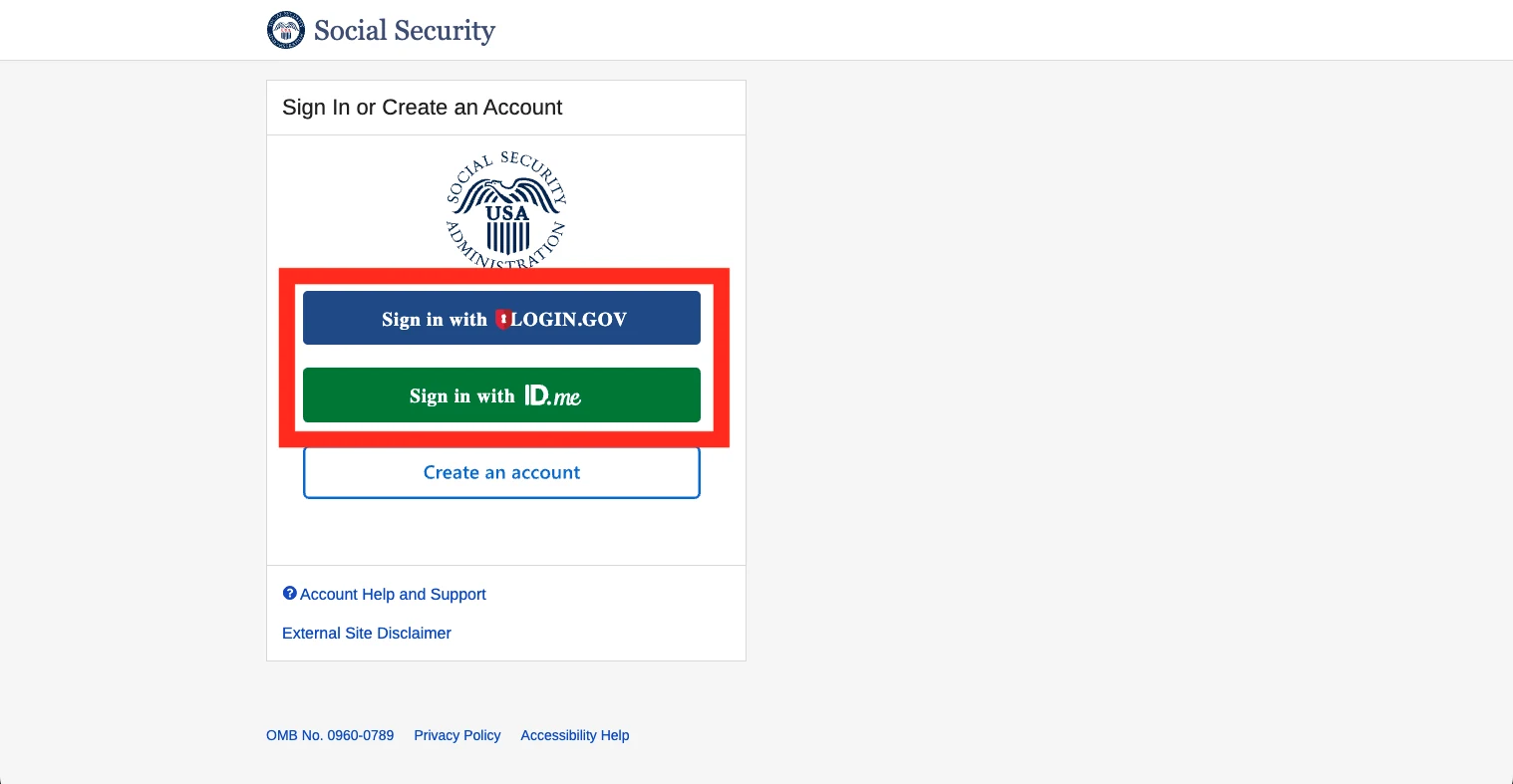
If it doesn't look like this
I'm on the ID.me route and I accidentally picked Self-Service or Video Call before finding the international link.#
ID.me's own guidance is to use the international escape hatches instead - 'I don't have a US phone number' or 'I don't have a US address', which appear elsewhere in the flow once it detects you're stuck. Restarting from ssa.gov/myaccount and taking the 'I don't live in the United States' link on the first Verify screen is more reliable than trying to back out mid-flow.
The ID.me video-call queue is very long, or nobody's available.#
This is the most commonly reported friction point in the whole international ID.me path. There's no published maximum wait; if it's genuinely stuck, SSA's fallback for a failed online verification is a phone or in-person route - see the numbers in the outcome section.
Have (or create) a Login.gov account
If you already have a Login.gov account, you have nothing to do here - go straight to the next step and sign in. If you don't, choose 'Sign in with Login.gov' then 'Create an account': registration starts with your email address, a password, and a choice of second-factor method - text message, phone call, an authenticator app, a security key, or printed backup codes - then asks you to photograph a state driver's licence, state ID, or passport and take a live selfie for comparison.
If it doesn't look like this
I don't want to give a mobile number.#
Login.gov doesn't require one. You can register a security key, a landline (via phone call rather than text), or generate ten one-time backup codes instead. Backup codes are, in Login.gov's own words, 'the least secure option' - printed or written codes are easier to lose or have stolen than a phone-based method - but they work.
Sign in with your Login.gov email and password
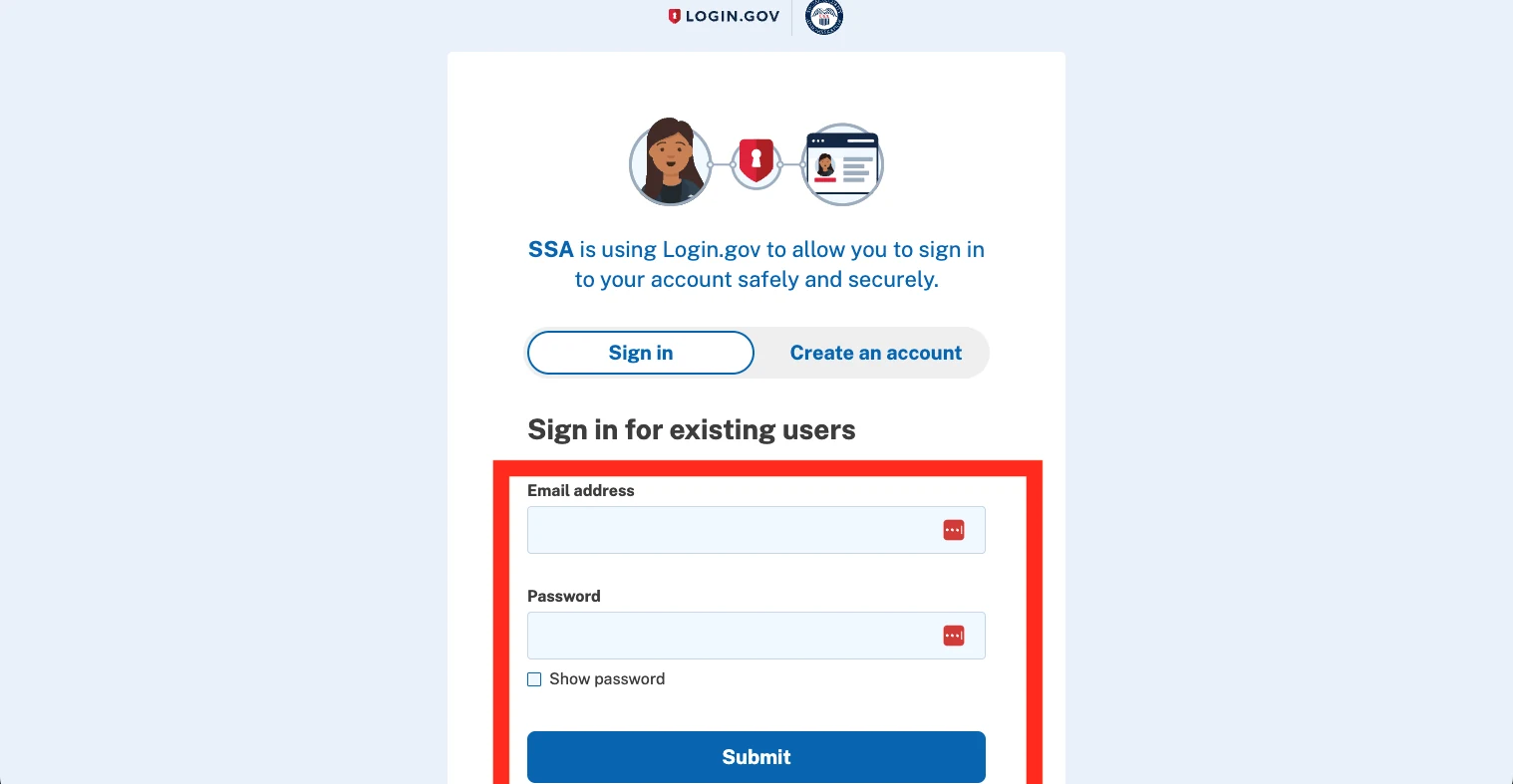
If it doesn't look like this
Complete two-factor authentication
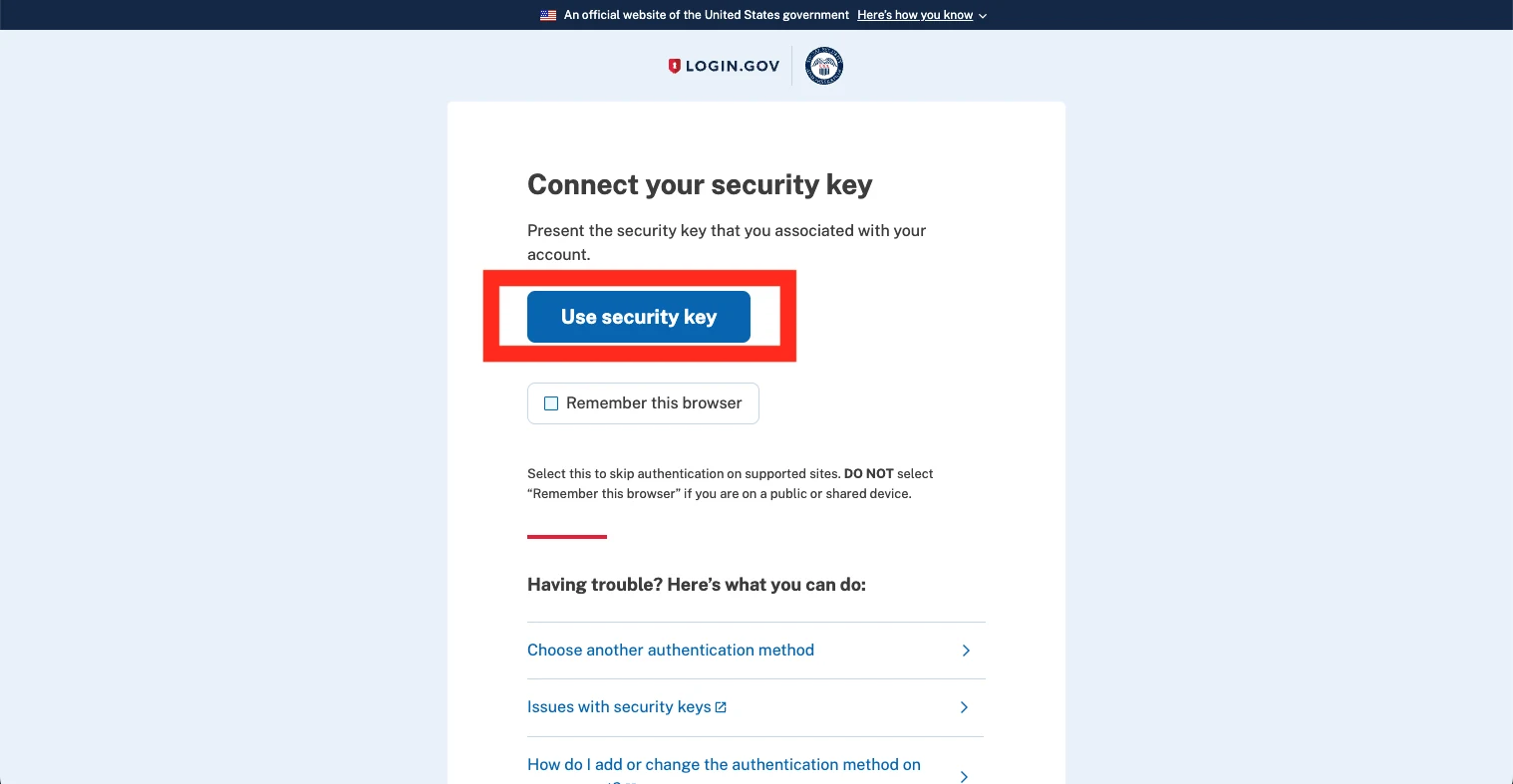
If it doesn't look like this
I don't have my security key / can't use my usual method.#
Use 'Choose another authentication method' on this screen to fall back to any other second factor you registered - a phone code, an authenticator app, or your printed backup codes. If you've lost every method, Login.gov's own account-recovery flow is the only way back in; SSA can't reset a Login.gov factor for you.
Sign in, then agree to SSA's terms
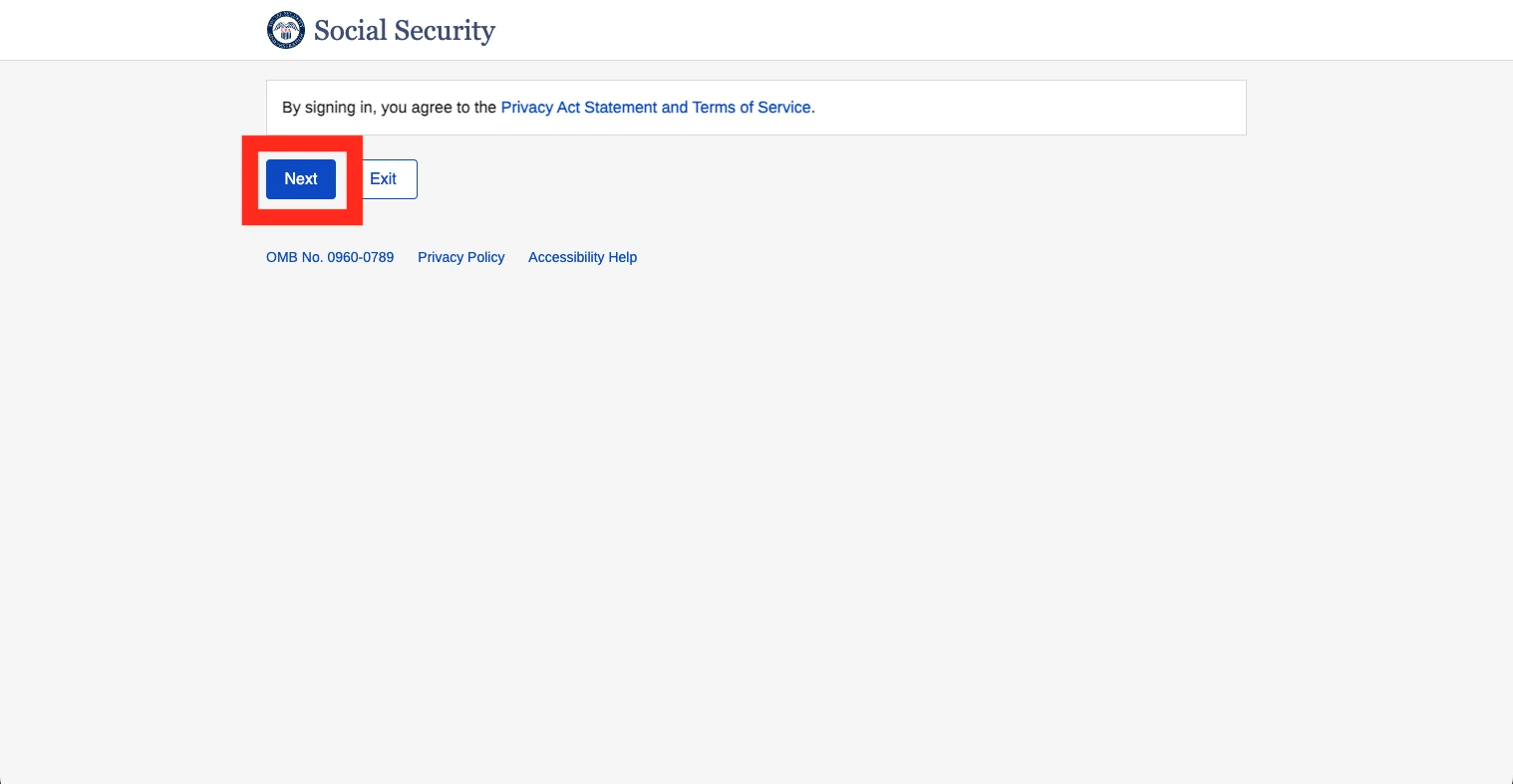
If it doesn't look like this
I have accounts with both providers now - does it matter which I use going forward?#
No. SSA's FAQ confirms you can hold both and sign in to my Social Security with either one; you don't need to standardise on a single provider.
On your dashboard, open 'Your Social Security Statement'
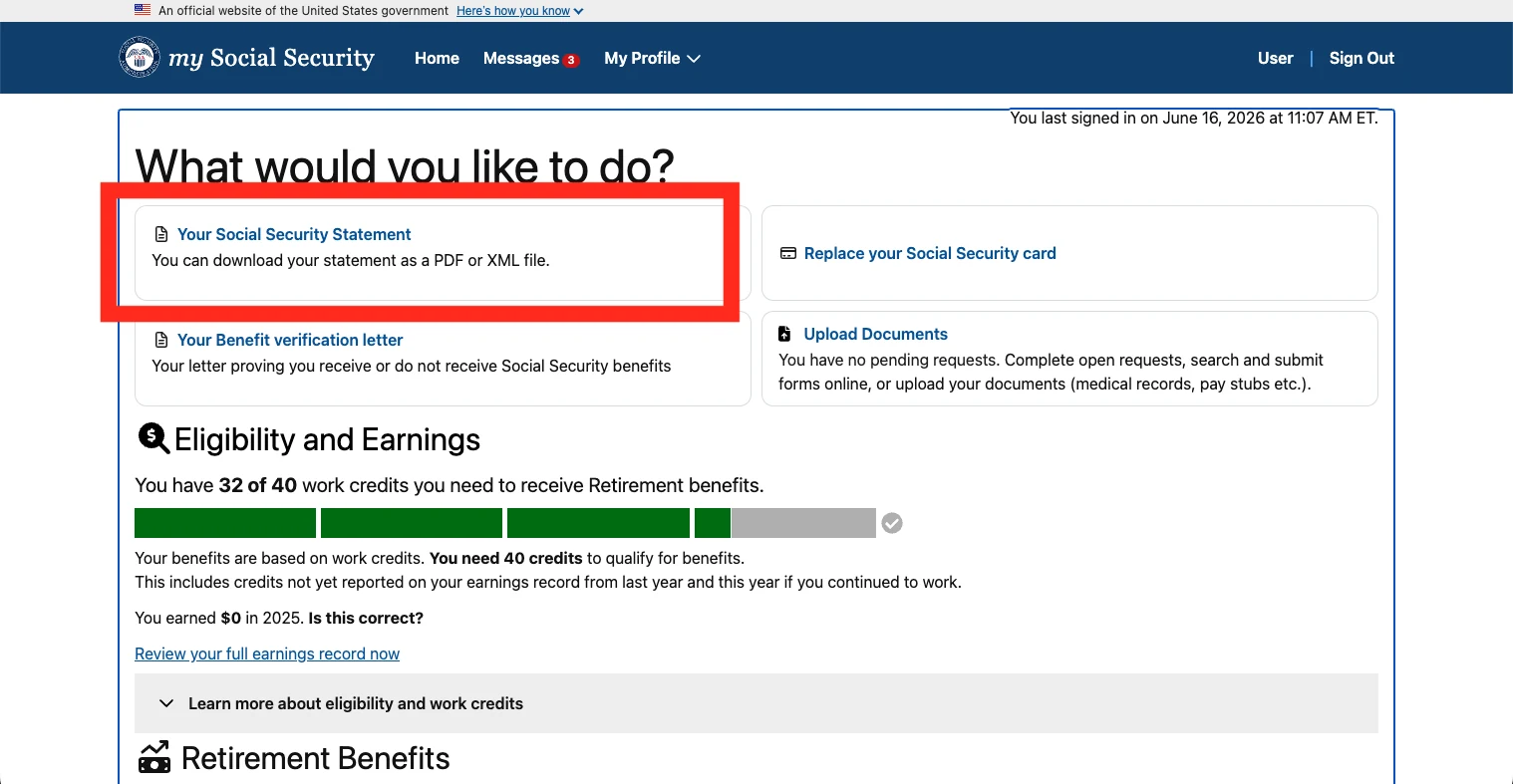
If it doesn't look like this
I can't find the Statement link on the dashboard.#
SSA's own 'What is an Account?' page lists getting your Statement among the core things a non-beneficiary account can do, alongside viewing retirement estimates and checking your application status - it should be a prominent action on the dashboard, not buried in a menu. If it genuinely isn't there, the account may not have completed identity verification yet; check for an unresolved verification prompt first.
Click the Statement link again to download the PDF
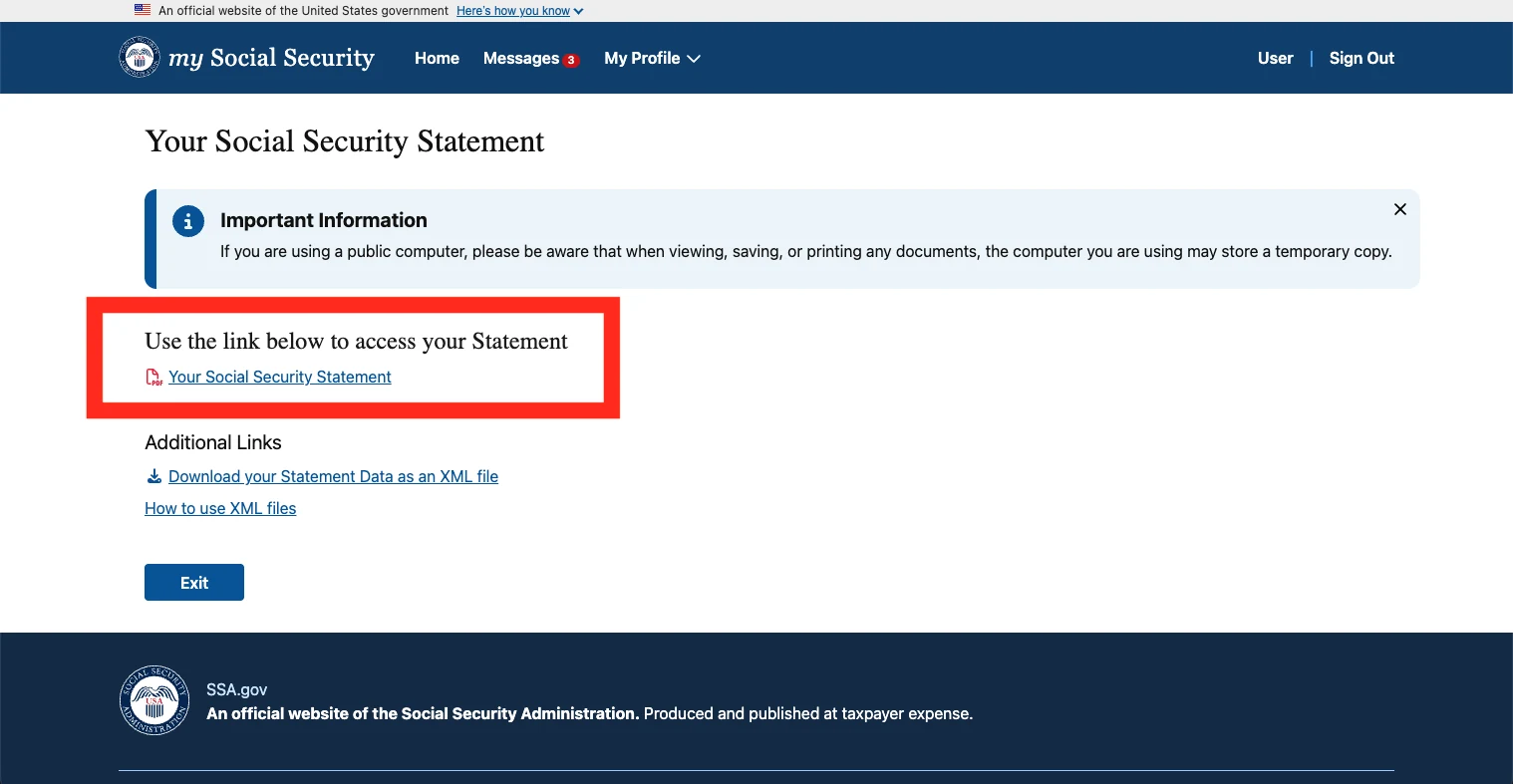
What happens next
Your Statement is on screen and downloadable the moment you finish the click-through above - there is no waiting period for the online version, unlike the mailed one. Save the PDF; it's a snapshot of your earnings record and benefit estimates as SSA holds them on that date.
If it doesn't look like this
My identity verification failed and I can't get into the online account at all.#
SSA's fallback is a phone call to 1-800-772-1213 (TTY 1-800-325-0778), or - if you're not in the US - the Office of Earnings & International Operations at 1-855-522-6936, 7am–5pm Eastern, or email oio.net.post@ssa.gov. SSA's own guidance says if you were unable to create or had a problem with your account and need in-person help, you make an appointment at your local Social Security office - but there are no Social Security offices outside the US, so for anyone abroad the actual in-person alternative is your nearest American embassy or consulate, which SSA says has trained personnel to assist with Social Security services.
I don't want to deal with any of this online - can I just get a paper copy?#
Yes. Print and complete Form SSA-7004 ('Request For Social Security Statement') and mail it to Social Security Administration, Wilkes-Barre Direct Operations Center, P.O. Box 7004, Wilkes-Barre, PA 18767-7004. It's free, and SSA states it arrives in four to six weeks. SSA's international-operations page currently carries a live warning that mail service disruptions in some countries mean documents sent to or from SSA can be delayed or undelivered - worth checking with your local postal service before relying on this route from abroad.
I'm 60 or older and don't have an online account - do I need to do anything?#
Not necessarily. SSA mails a paper Statement automatically, three months before your 60th birthday, to anyone who doesn't have an online account and isn't yet receiving benefits. If you don't want to wait for that scheduled mailing, request one now via SSA-7004 or create the online account instead.
Worked somewhere else too?
Each country holds its own record, and none of them talk to each other until you claim. These walk the other portals the same way.
Questions people actually ask
Can I get my Statement without a US mailing address?#
Yes, but not through Login.gov - its account-creation flow has no address field for a civilian living abroad, only the 50 states, DC, US territories, and military addresses. You need an ID.me credential instead. On ID.me's 'Verify Your Identity' screen, skip the Self-Service and Video Call radio buttons and use the 'I don't live in the United States' link beneath them, which routes you through a country-specific flow that generally ends in a live video call with a Trusted Referee.
Do I need a US phone number?#
No, for either provider. SSA's own transition FAQ states a phone is not required for Login.gov or ID.me - you can use a security key, a landline call, or printed backup codes for the second factor instead. The genuine gate for people abroad is Login.gov's address requirement, not a phone number.
How many years of work do I need to qualify for retirement benefits?#
At least 10 years of covered work - 40 credits in SSA's terminology - to qualify for retirement benefits at all, per SSA's own published statement content. Benefit amounts are calculated from your highest 35 years of earnings; fewer than 35 years of covered work means the missing years count as zero and reduce your average.
I worked in another country - do those years count toward a US Social Security benefit?#
Sometimes, through a bilateral Totalization Agreement. The US has active agreements with 30 countries (including Ireland, the UK, and most of the EU) as of April 2026, letting periods of coverage in either country be combined to help meet minimum eligibility where neither country's record alone would qualify you, with each country then paying its own proportional share. Foreign-covered periods don't appear as figures on your Social Security Statement itself - the Statement is a US-earnings record - so a Totalization Agreement is something you'd invoke at claim time, not something reflected in this document.
What's the difference between Login.gov and ID.me?#
Both are federally-accepted identity credentials and either works for my Social Security once you're registered - SSA's transition FAQ says you can hold both and use either to sign in. The practical difference is who can register: Login.gov requires a US address (states, DC, territories, or a military address) and SSA's own comparison table calls it best for users inside the US; ID.me accepts non-US addresses and is SSA's stated best option for users inside or outside the US.
I can't verify online at all - what's the alternative?#
Call 1-800-772-1213 (or, from outside the US, the Office of Earnings & International Operations on 1-855-522-6936, 7am–5pm Eastern), or request the paper Statement via Form SSA-7004 by mail - free, four to six weeks. SSA's stated in-person fallback is a local Social Security office, but there are none outside the US; for anyone abroad the working in-person alternative is a US embassy or consulate.
Official sources
- Get Your Social Security Statement - SSA
- my Social Security - SSA
- Create an Account - SSA
- What is an Account? - SSA
- Learn about changes we're making to your personal my Social Security account - SSA
- Service Around the World - Office of Earnings & International Operations, SSA
- How will I access my personal Social Security account if I am overseas? - SSA FAQ
- How can I get a Social Security Statement? - SSA FAQ
- Request for a Social Security Statement (SSA-7004) - SSA
- Form SSA-7004 - SSA
- U.S. International Social Security Agreements - SSA
- Access Your New Social Security Statement Online - SSA Blog
- Verifying if you live outside of the U.S. and have an SSN - ID.me Help Center
Last checked against the live portal on . Government portals get redesigned without notice - if a screen here no longer matches what you see, trust the portal, not us. This guide is independent and is not affiliated with the Social Security Administration.