Ireland · Department of Social Protection
How to request your PRSI Contribution Statement
- Time
- About 5 minutes to request
- Cost
- Free
- You need
- A basic MyGovID account · Your PPS number · The phone or app with your login codes
Before you start: do you have a MyGovID account?
MyWelfare has no login of its own - it hands you to MyGovID, the government's single sign-on. Already have one? Skip to step 1. If not, create a free basic account first (just a name and email, about two minutes) - a basic account is all you need here, despite the common claim that it must be verified.
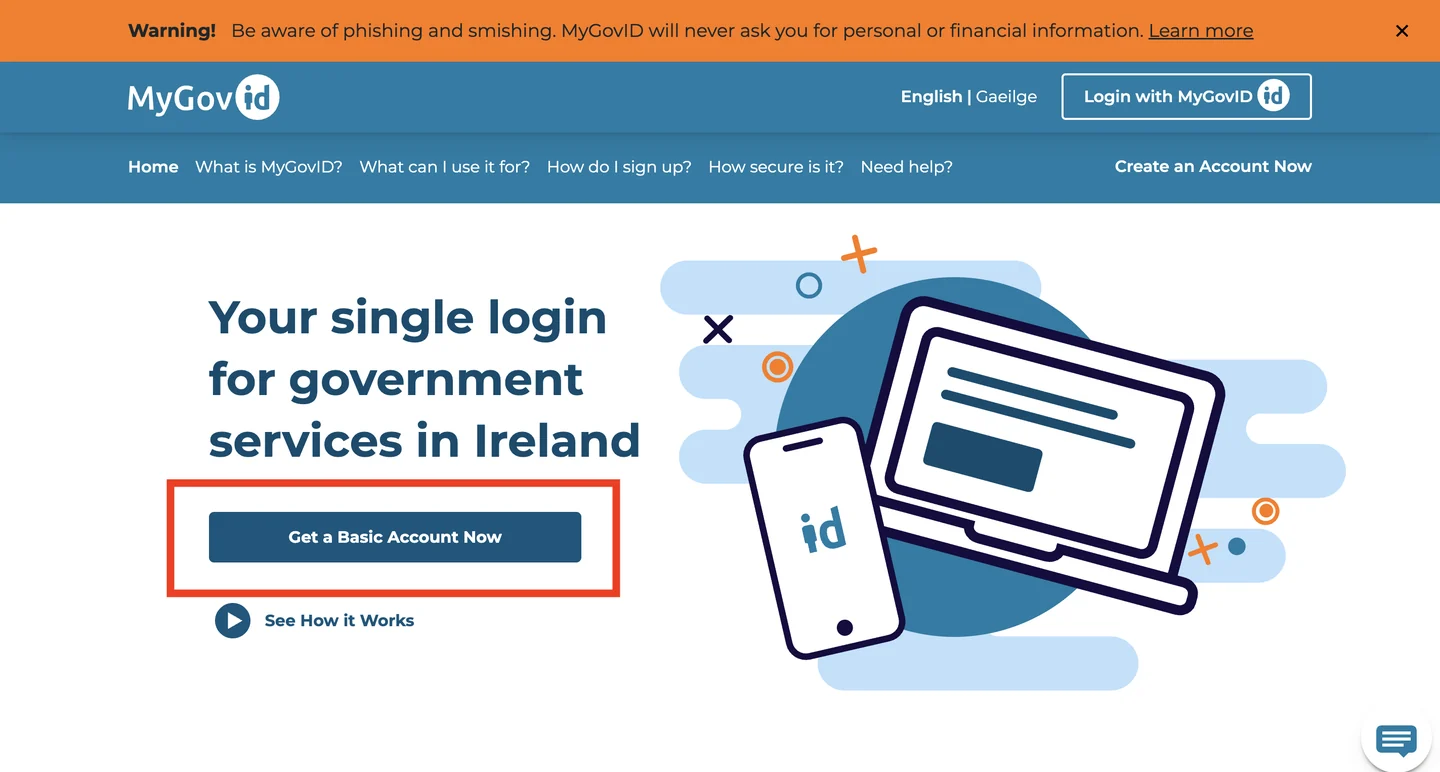
If it doesn't look like this
I live outside Ireland - can I still create a MyGovID account?#
Yes, and a basic account is not just sufficient but almost certainly your only option. Verified status requires a Public Services Card, which the Department will not issue unless you are residing at an address on the island of Ireland; the alternative app-based verification also requires Irish residency plus an Irish passport book. None of that matters, because basic is enough to request a Contribution Statement. The obstacle for emigrants is elsewhere - see the address question below.
I'm abroad and the address the Department holds is one I left years ago#
This is the real emigrant trap, and it is worth planning for rather than discovering. The basic-account route matches the address you type against the one on file, which for someone who emigrated is very likely their pre-emigration Irish address rather than where they live now. Try the old Irish address first. If the match still fails, the stated remedy is an in-person Intreo Centre visit, which is no remedy at all from abroad - so contact PRSI Records in Buncrana directly instead, by email at contributionstatement@welfare.ie or on +353 1 471 5898. That route bypasses the online identity check entirely.
What is a PPS number and where do I find mine?#
Your Personal Public Service number is the identifier every Irish social insurance record hangs from. It is printed on your Public Services Card, on any payslip from an Irish employer, on correspondence from Revenue or the Department of Social Protection, and on your Tax Credit Certificate. Without it you cannot request a Contribution Statement.
Go to MyWelfare.ie and choose Login with MyGovID
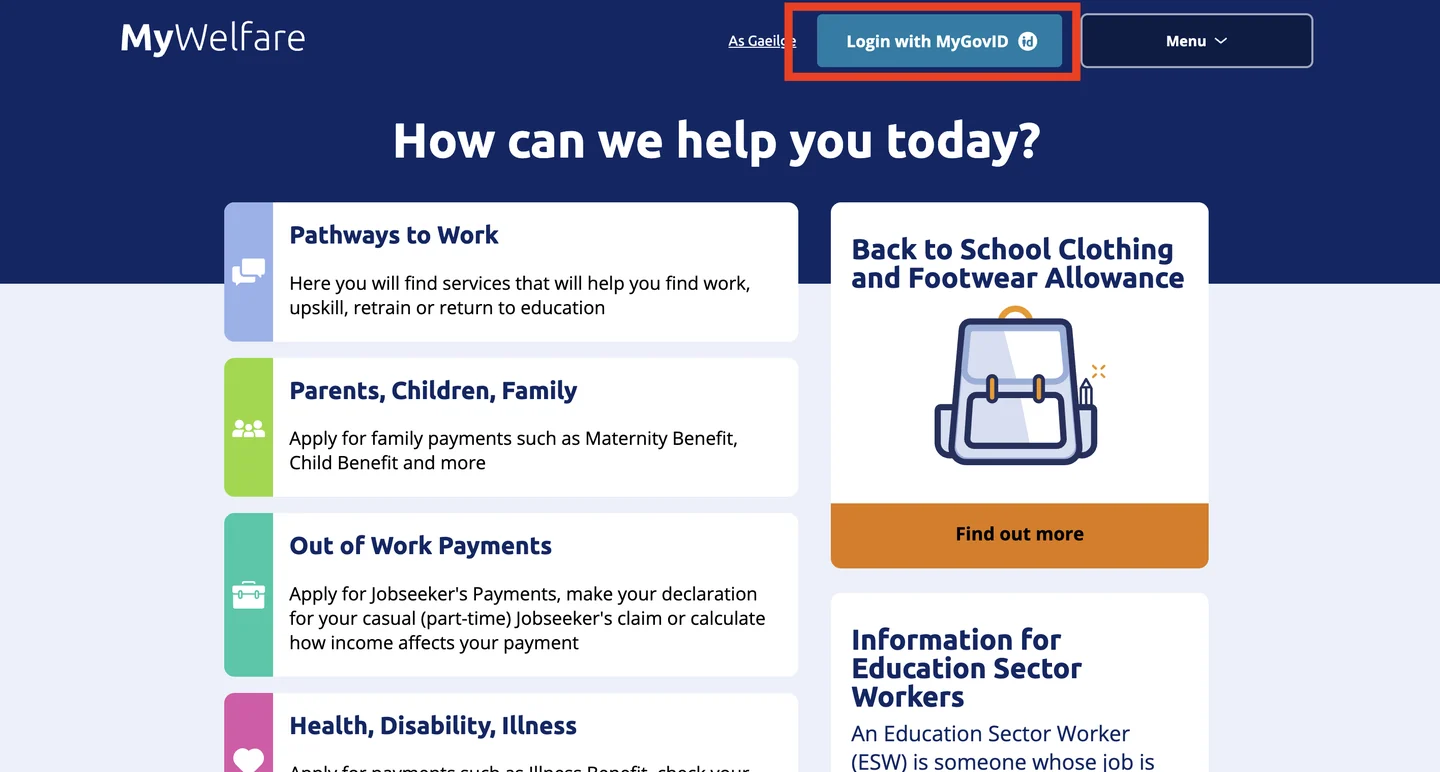
- MyWelfare.ieOfficial
If it doesn't look like this
Is MyWelfare the same thing as MyGovID?#
No, and the split confuses almost everyone. MyGovID is the identity - the account, the password, the login codes. MyWelfare is the service you are logging in to, run by the Department of Social Protection, where the Contribution Statement actually lives. You will bounce between the two domains during login, which is expected behaviour and not a phishing redirect.
Enter your MyGovID email address and password
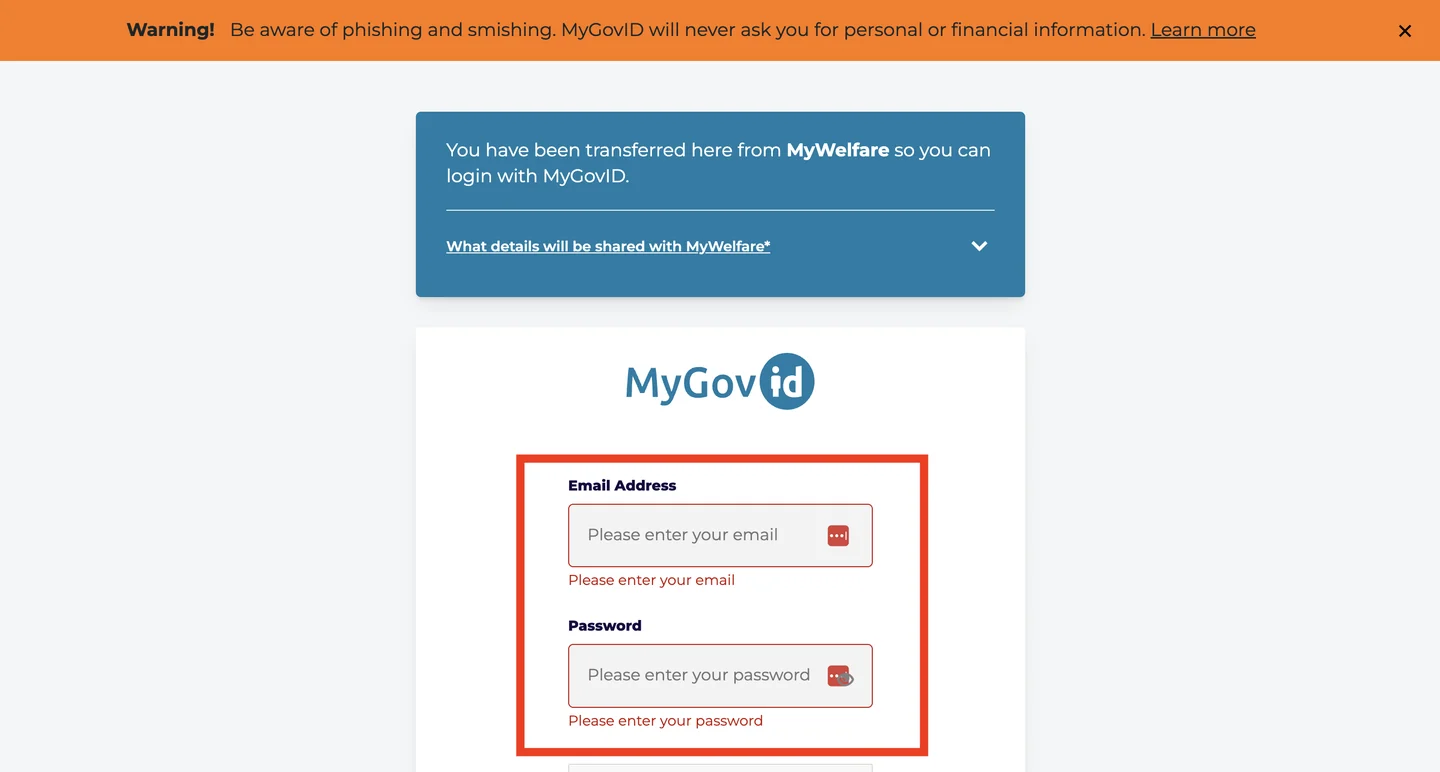
If it doesn't look like this
I've forgotten my MyGovID password#
Use the 'Forgot password' link on this screen; the reset goes to the email address the account was registered with. If you no longer have access to that mailbox - a work address from a job you left, most commonly - the self-service route is closed and you will need to contact the MyGovID helpdesk directly to recover the account.
It says my email or password is wrong but I'm sure they're right#
Check you are not signing in with a second account you created years ago and forgot. Duplicate MyGovID accounts against the same person are common, and only one of them will be linked to your PPS number. Repeated failed attempts will lock the account temporarily.
How do you get your MyGovID login codes?
MyGovID needs a second factor, and which screen you see next depends on how your account was set up. Pick the one that matches you - the two routes rejoin immediately afterwards.
Enter the 6-digit code from your authenticator app
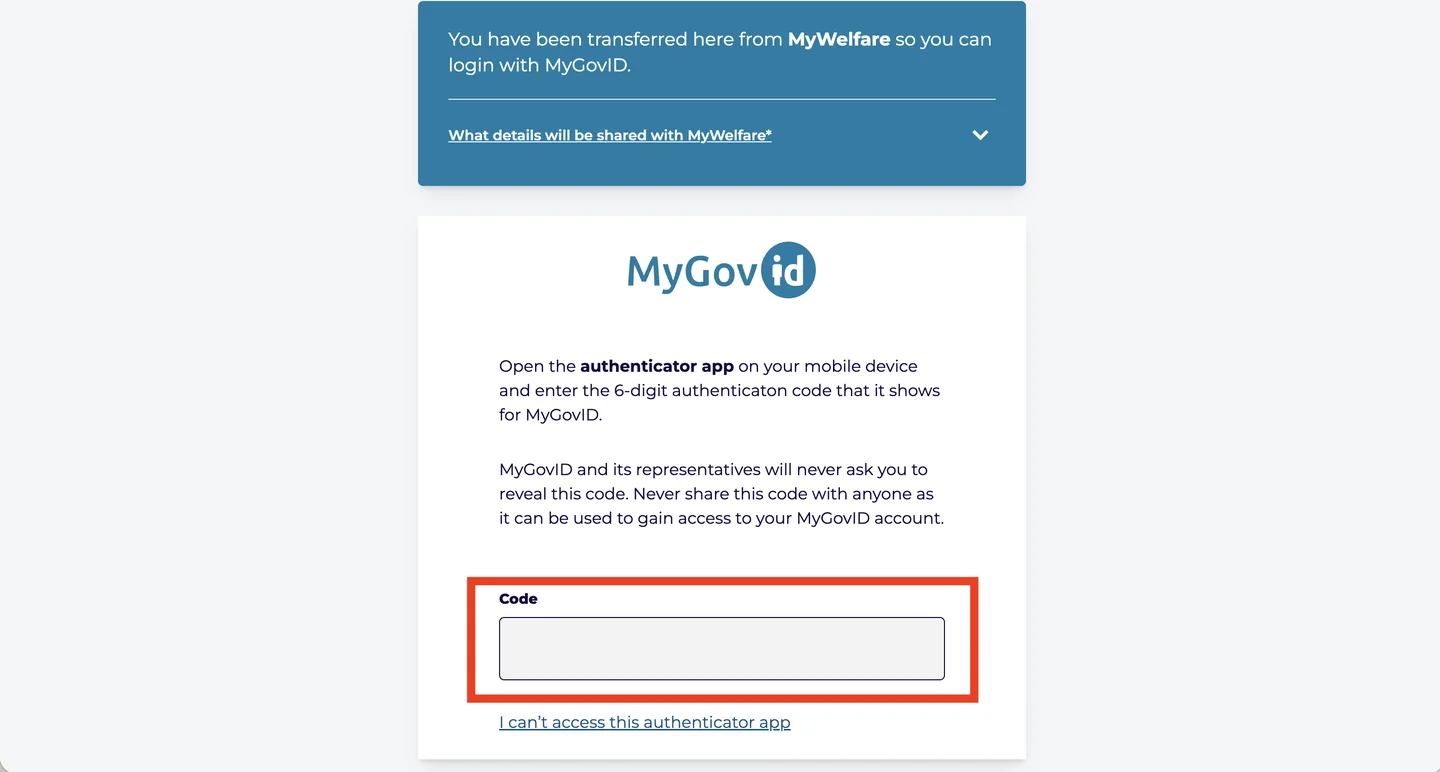
If it doesn't look like this
My authenticator app was on a phone I no longer have#
This is the single most common way people get locked out, and the codes cannot be moved after the fact. Use the 'I can't access this authenticator app' link on this screen and take the text-message route instead. Once you are back in, go to MyProfile → Privacy & Security, disable the Authenticator App, then re-enable it to register your new device.
The code is rejected even though I typed it correctly#
Authenticator codes are time-based, so a phone whose clock has drifted will generate codes that are valid a minute either side of now and rejected. On Android check Settings → Date & time → Set automatically; in Google Authenticator specifically there is a 'Time correction for codes' option that resyncs it.
Get a login code by text message instead
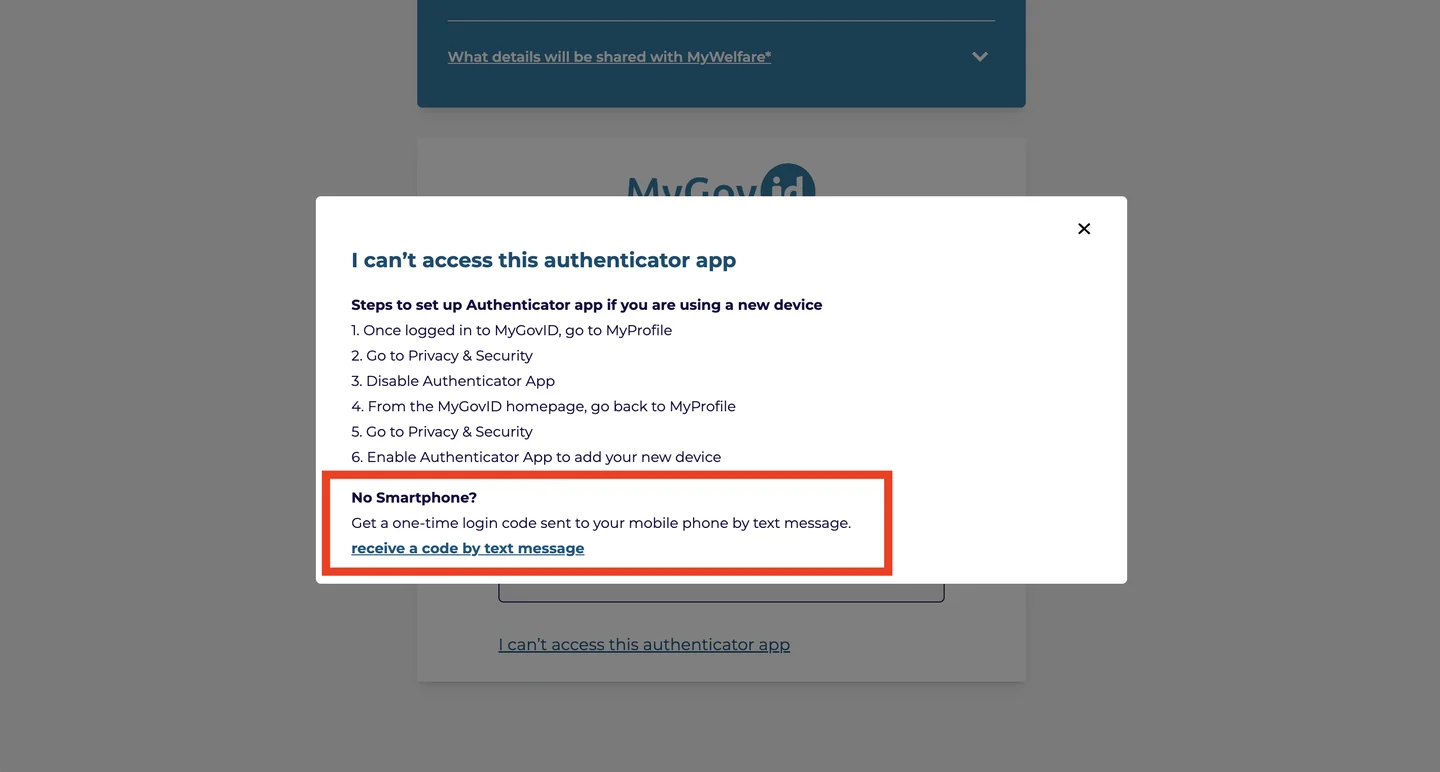
If it doesn't look like this
No text message arrives#
MyGovID names three causes for this, and they are more mundane than they look. Some mobile networks now apply marketing blocks against messages containing 6- or 8-digit codes, and the block has to be lifted by your provider. On an iPhone, iMessage can swallow the message - turning iMessage off lets it through as an ordinary SMS. On Android with Google Messages, verification codes frequently land in the Spam or Blocked folder rather than the inbox. Check all three before assuming the request failed, and give it a couple of minutes before asking for another, since a fresh code invalidates the previous one.
Do I need an Irish mobile number?#
No. MyGovID accepts international phone numbers as well as Irish ones, so emigrating does not by itself cut you off from login codes. The problem is only ever a number you no longer control - not a number with the wrong country code.
The code goes to a number I no longer use#
Changing the registered number generally requires being logged in, which is exactly what you cannot do. Contact the MyGovID helpdesk on 0818 927 999 (or +353 71 967 2616 from abroad), or email support@mygovid.ie, and expect to prove your identity another way. Be warned that if you have forgotten your password AND lost the number, MyGovID's own guidance is that you will have to register a new account - there is no recovery path through both at once.
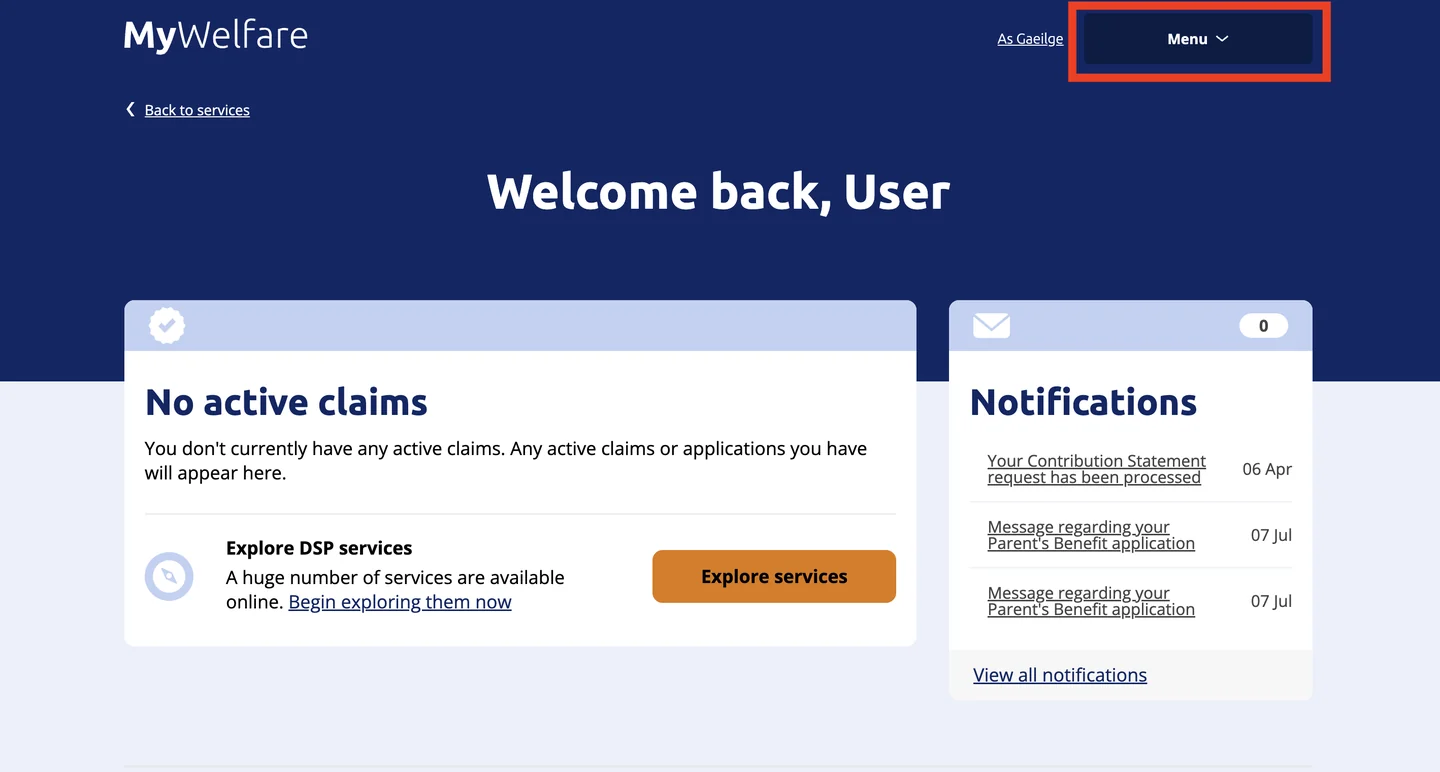
Open the Menu on your MyWelfare dashboard
Choose Explore services
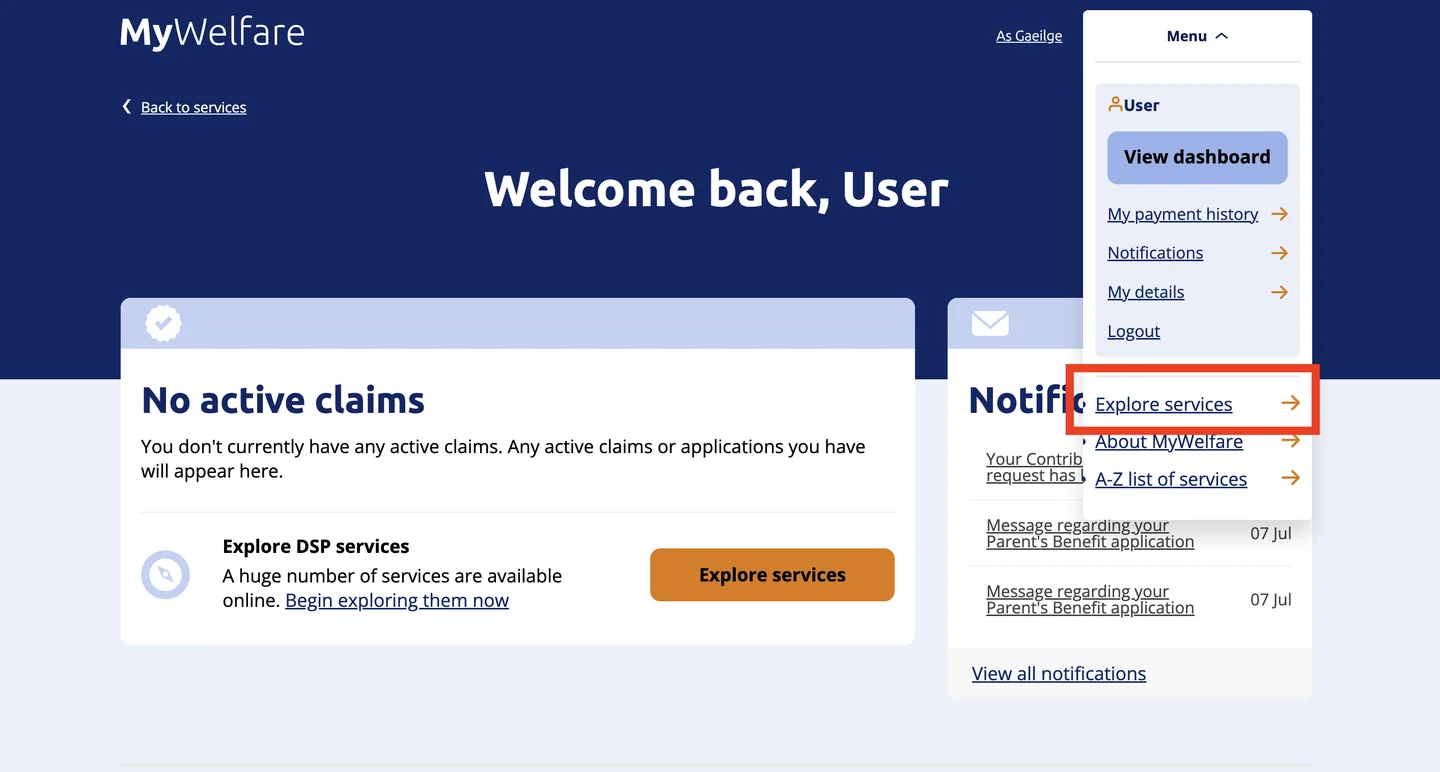
If it doesn't look like this
Open Statements, Refunds and Repayments → Contribution Statement
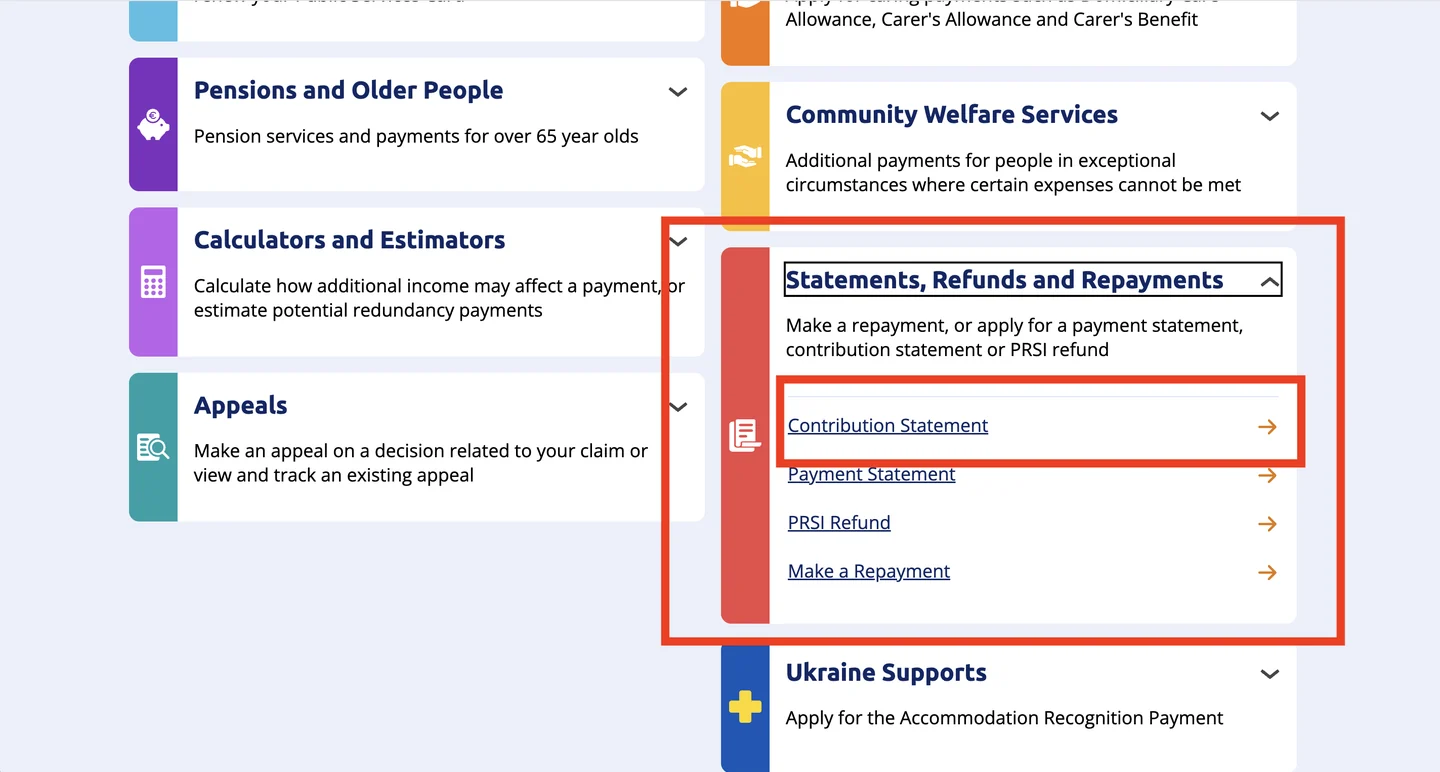
If it doesn't look like this
What's the difference between a Contribution Statement and a Payment Statement?#
A Contribution Statement is your social insurance record: the PRSI contributions you have paid in, by year. A Payment Statement is the opposite direction - money the Department has paid out to you in welfare payments. For anything to do with your State Pension entitlement, you want the Contribution Statement.
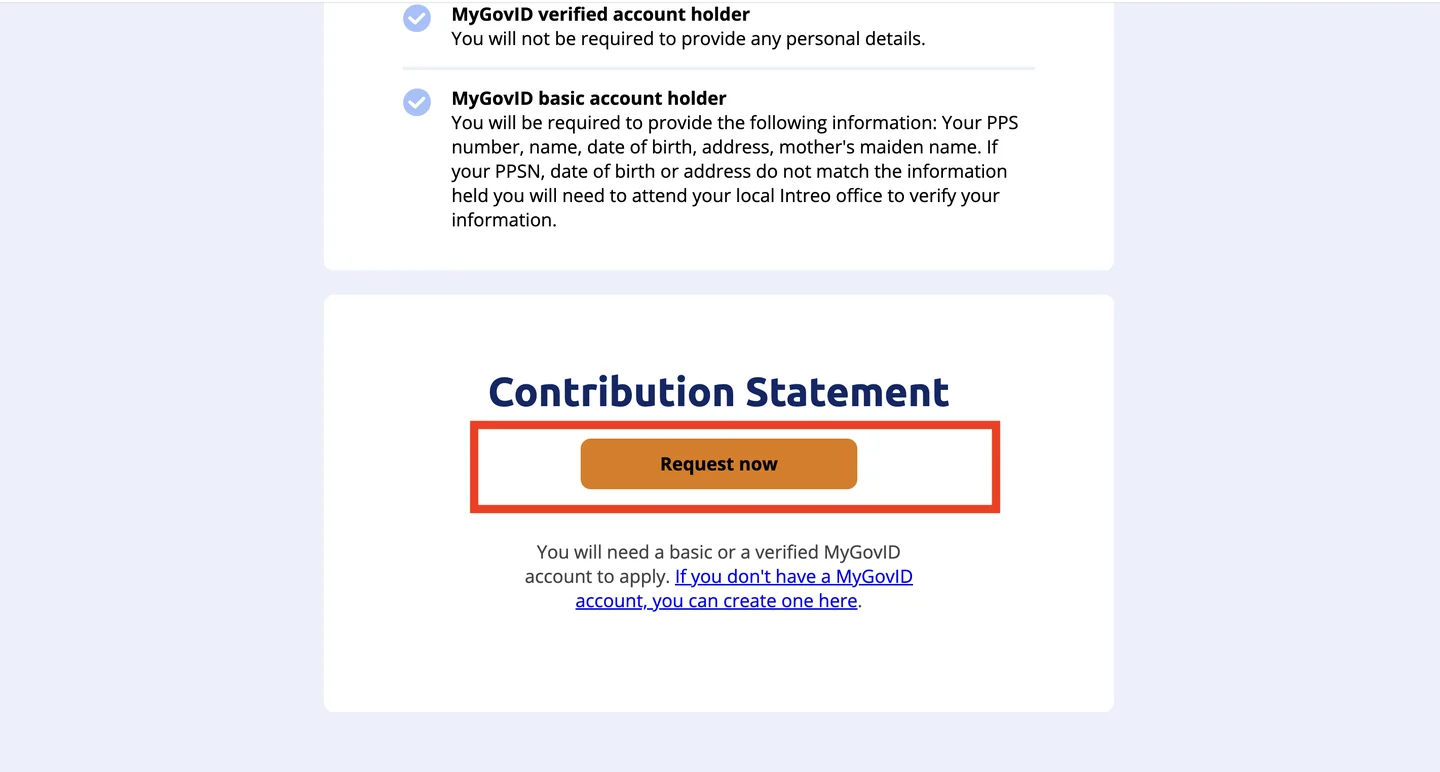
Press Request now
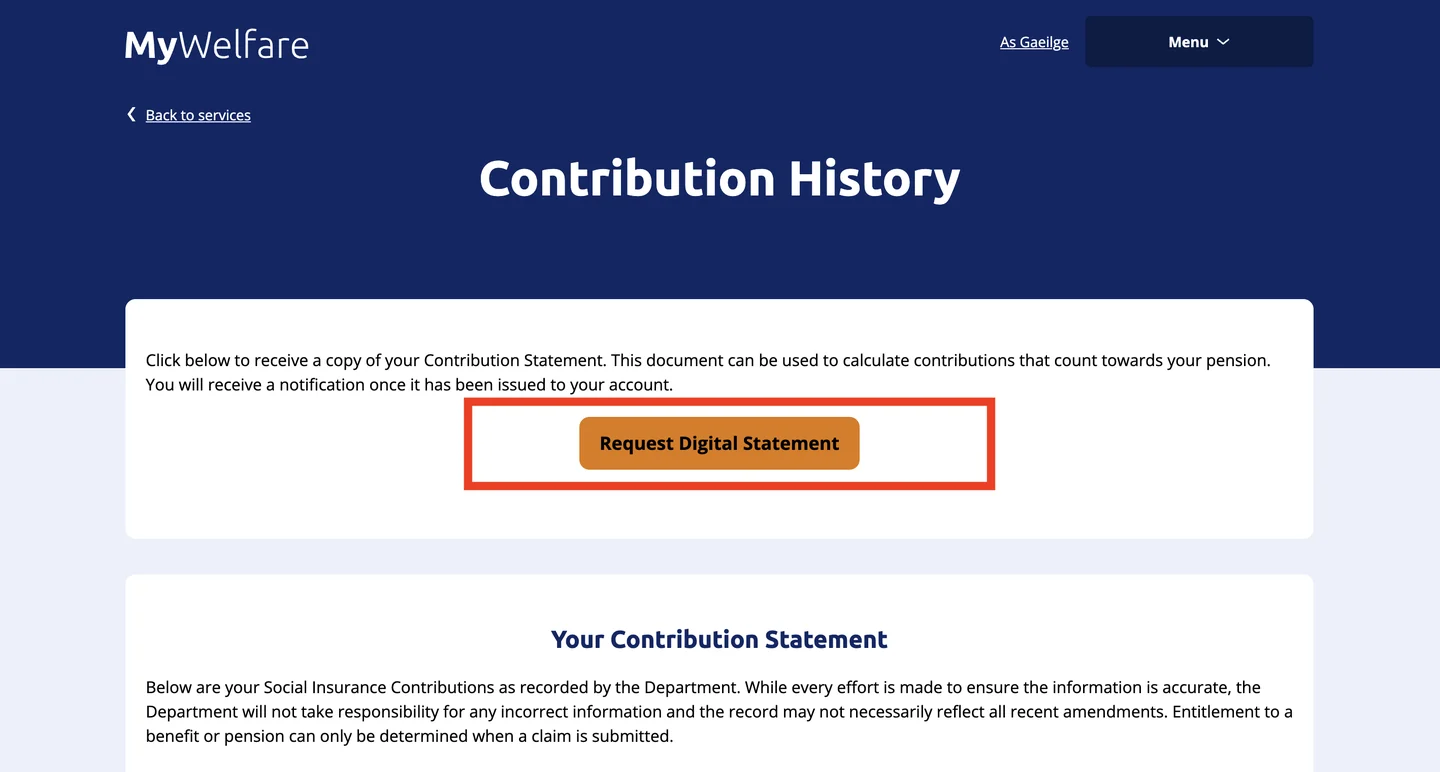
Press Request Digital Statement
What happens next
Your statement arrives as a notification in your MyWelfare account, reading 'Your Contribution Statement request has been processed'. You collect it by logging back in to MyWelfare and opening your notifications - so do not sit waiting on the request page.
If it doesn't look like this
My record has gaps for years I know I worked in Ireland#
Gaps are common and they are not always errors - periods of unemployment, education, caring, or work abroad legitimately show as blank. But genuine omissions do happen, particularly around job changes and employers who did not remit correctly. Because contributions determine State Pension entitlement, a missing year is worth chasing: email contributionstatement@welfare.ie with the employer's name, the dates, and any payslips or P60s you still hold. The Department checks its own files and Revenue's, covering both you and the employer. Written statements from former colleagues can help and do not need to be sworn affidavits.
I also worked in another EU country - do those years count?#
For qualifying purposes, yes: EU social security coordination lets insurance periods completed in other member states be combined with your Irish record, so periods too short to qualify anywhere on their own can still produce an entitlement. Each country then pays a pension for its own periods. Overlapping periods are only counted once, and you need a minimum Irish record before anything can be aggregated onto it. Note that the UK is now covered by a separate Ireland–UK convention rather than by the EU regulations.
Do I send my Contribution Statement to the other country myself?#
No - and this trips up almost everyone. For state pensions the institutions exchange records between themselves: when you claim, the Department of Social Protection requests your contribution history directly from the other member state, prompted by a question on the application form asking whether you have ever worked abroad. You are not the courier, and there is no claimant-carried form for pensions. (Form U1 covers unemployment benefits and S041 covers sickness - neither applies here, and S041 can only be requested by an institution anyway.) What your Contribution Statement is genuinely for is checking that the Irish half is complete and correct before you claim, because corrections take time and a dispute discovered mid-claim delays the pension.
Worked somewhere else too?
Each country holds its own record, and none of them talk to each other until you claim. These walk the other portals the same way.
Questions people actually ask
How long does a PRSI Contribution Statement take to arrive?#
The Department of Social Protection does not publish a turnaround time, and accounts genuinely differ - some people report the statement being viewable almost at once, others report a wait, and some report it arriving by post. What is consistent is where it turns up: a notification in your MyWelfare account reading 'Your Contribution Statement request has been processed'. Log back in and check your notifications rather than waiting on the request page. If a couple of weeks pass with nothing, contact PRSI Records directly on +353 1 471 5898 or at contributionstatement@welfare.ie.
Is there a charge for a Contribution Statement?#
No. Requesting your Contribution Statement through MyWelfare is free, and nothing stops you requesting it again later.
Can I get a Contribution Statement without a verified MyGovID account?#
Yes, and this is the most commonly misreported fact about the whole process - many guides insist you need a verified account, and they are wrong. Citizens Information explicitly lists requesting a record of your PRSI contributions among the services a basic MyGovID account can reach, and MyWelfare states a Contribution Statement can be requested by anyone with a MyGovID account. The trade-off is that a basic account holder must additionally supply their PPS number, name, date of birth, address and mother's maiden name, all matching the records the Department already holds. A verified account holder is asked for none of it.
Can I request my Irish PRSI record from abroad?#
Yes. MyWelfare has no geographic restriction, MyGovID accepts international mobile numbers for login codes, and a basic account - which is all you need - can be created from anywhere with an email address. Verified status is effectively closed to non-residents, since a Public Services Card requires an address on the island of Ireland, but you do not need one. The genuine obstacle is the identity check on the basic route: it matches the address the Department holds, which for an emigrant is usually their pre-emigration Irish address. Try that address first, and if the match fails, contact PRSI Records in Buncrana directly rather than attempting the Intreo Centre visit the error message suggests.
Why is this year missing from my PRSI record?#
Because the statement only covers up to the end of the last complete tax year - the year in progress is never on it, and its absence is not an error. Contributions for the current year sit with Revenue rather than the Department of Social Protection: sign in to Revenue's myAccount and look under 'Manage my Tax'.
What does the Contribution Statement actually show?#
It is organised by year, with columns for paid contributions, credited contributions, Long-Term Carers Contributions, reckonable contributions for pension, reckonable credited contributions for pension, and a combined total. Note what is not there: it counts weeks, not money, so there are no earnings figures, and it offers no pension projection. If you specifically need your contribution class history - Class A, S and so on - the Department's published column guide does not include it, so ask PRSI Records directly rather than assuming it will appear.
How many PRSI contributions do I need for the State Pension?#
You need at least 520 full-rate contributions - ten years - to qualify for the State Pension (Contributory) at all. For the maximum personal rate under the Total Contributions Approach you need 2,080 contributions, roughly forty years, with less than that paid proportionately. Since January 2025 the older Yearly Average method has been in a ten-year phase-out, and until 2034 people born on or after 1 January 1959 are assessed on whichever method gives the better result. These thresholds change with policy, so treat them as orientation and confirm against Citizens Information before making any decision that depends on them.
Does the Contribution Statement tell me what my State Pension will be?#
No, and MyWelfare says so explicitly on the page: your online record is not a forecast of your State Pension. The statement is a record of contributions paid and credited to date. Entitlement is only determined when you actually claim, against the rules in force at that time.
What is the difference between a Contribution Statement and a Payment Statement?#
A Contribution Statement is money in - the PRSI contributions recorded against your PPS number, year by year. A Payment Statement is money out - welfare payments the Department has made to you. For pension purposes you want the Contribution Statement.
My authenticator app was on a phone I've lost - how do I get into MyGovID?#
Choose 'I can't access this authenticator app' on the code screen and use the 'receive a code by text message' link in the 'No Smartphone?' block at the bottom of the panel that opens. Once you are back in, go to MyProfile → Privacy & Security, disable the Authenticator App and re-enable it to register your new device. If the registered mobile number is also out of reach, no self-service route remains and you must contact the MyGovID helpdesk.
Why does my PRSI record have missing years?#
Blank years are not automatically mistakes: time spent unemployed, in education, caring, or working outside Ireland will legitimately show no Irish contributions. Real errors do occur too, most often around job changes. Since contributions drive State Pension entitlement, a year you are confident you worked is worth querying with the Department, with the employer's name, the dates, and any payslips or P60s you can produce.
Do my contributions in other EU countries count towards an Irish pension?#
For qualifying purposes, yes. EU social security coordination allows insurance periods completed in other member states to be aggregated with your Irish record, so that periods too short to qualify anywhere on their own can still produce an entitlement, with each country paying a pension for its own periods. Overlapping periods count once, and you need a minimum Irish record before anything can be aggregated onto it. The UK is a separate case since Brexit, covered by the Ireland–UK Convention on Social Security rather than by the EU regulations.
Do I need to send my Contribution Statement to another country's pension authority?#
No. For state pensions the institutions request records from each other directly - when you claim, the Department of Social Protection asks the other member state for your contribution history, triggered by a question on the application form about whether you have worked abroad. There is no claimant-carried document for pensions; Form U1 relates to unemployment benefits and S041 to sickness, and neither applies. Your Contribution Statement is for you: it is how you confirm the Irish half of the picture is complete and correct before you claim, which matters because corrections are slow and a dispute found mid-claim holds up the pension.
Official sources
- Request a Contribution Statement - gov.ie
- Contribution Statement - MyWelfare
- How to sign up for MyGovID - gov.ie
- MyGovID - Citizens Information
- Social insurance (PRSI) - Citizens Information
Last checked against the live portal on . Government portals get redesigned without notice - if a screen here no longer matches what you see, trust the portal, not us. This guide is independent and is not affiliated with the Department of Social Protection.